What Is MySQL?
MySQL is the world's most widely used open-source relational database management system (RDBMS). Developed by Oracle Corporation, MySQL runs behind the majority of web applications. Huge platforms such as WordPress, Facebook, Twitter and YouTube use MySQL.
MySQL organizes data into tables and provides access to this data using the SQL (Structured Query Language) language. With its reliable, fast and scalable structure, it is preferred across a wide range, from small projects to enterprise applications.
Installing MySQL
Windows
The easiest way on Windows is to use XAMPP or the MySQL Installer:
- Download the MySQL Installer from the official MySQL website
- Follow the installation wizard (the Developer Default option is recommended)
- Set your root password
- MySQL Workbench will be installed automatically
Linux (Ubuntu/Debian)
# Install MySQL Server
sudo apt update
sudo apt install mysql-server

# Security configuration
sudo mysql_secure_installation

# Start the MySQL service
sudo systemctl start mysql
sudo systemctl enable mysql

# Connect to MySQL
sudo mysql -u root -p
macOS
# Install with Homebrew
brew install mysql

# Start the service
brew services start mysql

# Set the root password
mysql_secure_installation
Creating a Database
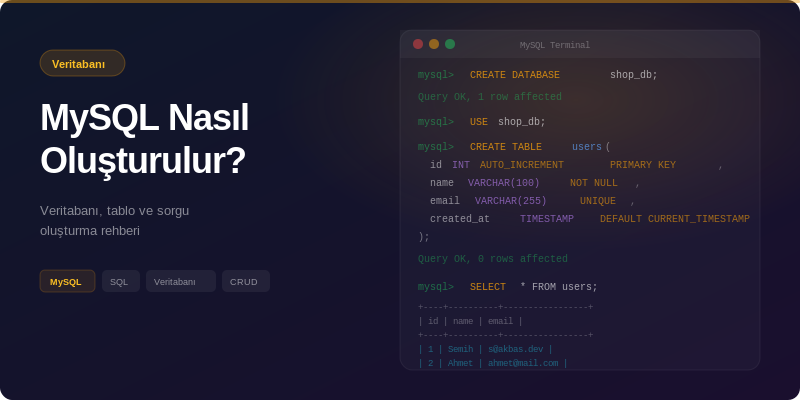
After connecting to MySQL, the first step is to create a database:
-- Create a new database
CREATE DATABASE magaza_db
CHARACTER SET utf8mb4
COLLATE utf8mb4_unicode_ci;

-- List existing databases
SHOW DATABASES;

-- Select the database (make it active)
USE magaza_db;

-- Drop the database (CAUTION!)
DROP DATABASE IF EXISTS eski_veritabani;
💡 Tip: The
utf8mb4character set supports Turkish characters and emojis. It is recommended to always use theutf8mb4_unicode_cicollation.
Creating Tables
Tables are the basic building blocks of a database. Each table stores a specific type of data:
Basic Table Structure
CREATE TABLE kullanicilar (
    id          INT AUTO_INCREMENT PRIMARY KEY,
    ad          VARCHAR(50) NOT NULL,
    soyad       VARCHAR(50) NOT NULL,
    email       VARCHAR(255) NOT NULL UNIQUE,
    sifre       VARCHAR(255) NOT NULL,
    telefon     VARCHAR(20),
    durum       ENUM('aktif', 'pasif', 'askida') DEFAULT 'aktif',
    created_at  TIMESTAMP DEFAULT CURRENT_TIMESTAMP,
    updated_at  TIMESTAMP DEFAULT CURRENT_TIMESTAMP ON UPDATE CURRENT_TIMESTAMP
) ENGINE=InnoDB;
Related Tables (Foreign Key)
-- Categories table
CREATE TABLE kategoriler (
    id      INT AUTO_INCREMENT PRIMARY KEY,
    ad      VARCHAR(100) NOT NULL,
    slug    VARCHAR(100) NOT NULL UNIQUE
) ENGINE=InnoDB;

-- Products table (linked to category)
CREATE TABLE urunler (
    id           INT AUTO_INCREMENT PRIMARY KEY,
    kategori_id  INT,
    ad           VARCHAR(200) NOT NULL,
    fiyat        DECIMAL(10,2) NOT NULL DEFAULT 0,
    stok         INT NOT NULL DEFAULT 0,
    aciklama     TEXT,
    aktif        TINYINT(1) DEFAULT 1,
    created_at   TIMESTAMP DEFAULT CURRENT_TIMESTAMP,

    FOREIGN KEY (kategori_id) REFERENCES kategoriler(id)
        ON DELETE SET NULL
        ON UPDATE CASCADE
) ENGINE=InnoDB;

-- Orders table
CREATE TABLE siparisler (
    id             INT AUTO_INCREMENT PRIMARY KEY,
    kullanici_id   INT NOT NULL,
    toplam_tutar   DECIMAL(10,2) NOT NULL,
    durum          ENUM('beklemede', 'hazirlaniyor', 'kargoda', 'teslim', 'iptal') DEFAULT 'beklemede',
    created_at     TIMESTAMP DEFAULT CURRENT_TIMESTAMP,

    FOREIGN KEY (kullanici_id) REFERENCES kullanicilar(id)
        ON DELETE CASCADE
) ENGINE=InnoDB;
Data Types
The most commonly used data types in MySQL:
| Type | Description | Example Use |
|---|---|---|
| INT | Integer (-2B to +2B) | id, stock, quantity |
| BIGINT | Large integer | Large IDs, statistics |
| VARCHAR(n) | Variable-length text | name, email, phone |
| TEXT | Long text (64KB) | description, content |
| DECIMAL(m,d) | Decimal number (exact) | price, rate |
| DATE | Date (YYYY-MM-DD) | date of birth |
| DATETIME | Date + Time | order time |
| TIMESTAMP | Timestamp | created_at, updated_at |
| TINYINT(1) | Boolean (0/1) | active, approved |
| ENUM | Fixed list of options | status, role |
| JSON | JSON data | settings, metadata |
CRUD Operations
CRUD refers to the four basic database operations:
CREATE — Inserting Data (INSERT)
-- Insert a single record
INSERT INTO kullanicilar (ad, soyad, email, sifre)
VALUES ('Semih', 'Akbaş', '[email protected]', '$2y$10$hash...');

-- Insert multiple records
INSERT INTO kategoriler (ad, slug) VALUES
    ('Elektronik', 'elektronik'),
    ('Giyim', 'giyim'),
    ('Kitap', 'kitap');

-- Insert data from another table
INSERT INTO arsiv_kullanicilar
SELECT * FROM kullanicilar WHERE durum = 'pasif';
READ — Reading Data (SELECT)
-- Fetch all data
SELECT * FROM urunler;

-- Fetch specific columns
SELECT ad, fiyat, stok FROM urunler WHERE aktif = 1;

-- Filtering and sorting
SELECT u.ad, u.fiyat, k.ad AS kategori
FROM urunler u
LEFT JOIN kategoriler k ON u.kategori_id = k.id
WHERE u.fiyat > 100 AND u.stok > 0
ORDER BY u.fiyat DESC
LIMIT 10;

-- Grouping and aggregation
SELECT k.ad, COUNT(*) as urun_sayisi, AVG(u.fiyat) as ortalama_fiyat
FROM urunler u
JOIN kategoriler k ON u.kategori_id = k.id
GROUP BY k.id
HAVING urun_sayisi > 5;
UPDATE — Updating Data
-- Update a single record
UPDATE urunler SET fiyat = 299.99, stok = 50 WHERE id = 1;

-- Conditional bulk update
UPDATE urunler SET aktif = 0 WHERE stok = 0;

-- Update using another table
UPDATE urunler u
JOIN kategoriler k ON u.kategori_id = k.id
SET u.fiyat = u.fiyat * 1.10
WHERE k.slug = 'elektronik';
DELETE — Deleting Data
-- Delete a single record
DELETE FROM urunler WHERE id = 5;

-- Conditional delete
DELETE FROM kullanicilar WHERE durum = 'pasif' AND created_at < '2024-01-01';

-- Delete all data (table structure is preserved)
TRUNCATE TABLE gecici_veriler;
Creating Indexes
Indexes greatly improve query performance:
-- Unique index
CREATE UNIQUE INDEX idx_email ON kullanicilar(email);

-- Regular index
CREATE INDEX idx_kategori ON urunler(kategori_id);

-- Composite index
CREATE INDEX idx_durum_tarih ON siparisler(durum, created_at);

-- Full-text index (text search)
ALTER TABLE urunler ADD FULLTEXT INDEX idx_arama (ad, aciklama);

-- Search with full-text
SELECT * FROM urunler
WHERE MATCH(ad, aciklama) AGAINST('laptop' IN NATURAL LANGUAGE MODE);
Using MySQL with PHP (PDO)
Modern PHP applications use PDO (PHP Data Objects) to connect to MySQL:
// Database connection
$dsn = "mysql:host=localhost;dbname=magaza_db;charset=utf8mb4";
$pdo = new PDO($dsn, "root", "sifre", [
    PDO::ATTR_ERRMODE => PDO::ERRMODE_EXCEPTION,
    PDO::ATTR_DEFAULT_FETCH_MODE => PDO::FETCH_ASSOC
]);

// Safe data insertion (Prepared Statement)
$stmt = $pdo->prepare("INSERT INTO urunler (ad, fiyat, stok) VALUES (?, ?, ?)");
$stmt->execute(["Laptop", 15999.99, 25]);

// Safe data retrieval
$stmt = $pdo->prepare("SELECT * FROM urunler WHERE fiyat BETWEEN ? AND ?");
$stmt->execute([1000, 5000]);
$urunler = $stmt->fetchAll();

foreach ($urunler as $urun) {
    echo $urun["ad"] . " - " . $urun["fiyat"] . " TL\n";
}
⚠️ Security: Never insert user input directly into an SQL query! Always use
Prepared Statements. This is the most basic defense against SQL Injection attacks.
Backup and Restore
# Back up the database
mysqldump -u root -p magaza_db > yedek_$(date +%Y%m%d).sql

# Back up specific tables
mysqldump -u root -p magaza_db urunler siparisler > tablolar_yedek.sql

# Restore from backup
mysql -u root -p magaza_db < yedek_20260214.sql
Performance Tips
- Use indexes: Add indexes to frequently queried columns
- Avoid SELECT *: Fetch only the columns you need
- Use EXPLAIN: Analyze query performance
- Connection pooling: Reuse existing connections instead of constantly opening new ones
- Normalization: Normalize your tables to prevent data duplication
- Appropriate data types: Choose the most suitable and smallest data type for each column
Conclusion
MySQL is a powerful and flexible database system. Learning basic SQL queries is a great advantage in both web development and data management careers. By following the steps in this guide, you can create your own database, design tables and manage your data.
Remember: A good database design is the foundation of a good application.