Introduction: Where does an executive's day go?
A technology executive's day is usually filled not with big decisions but with small tasks. Hundreds of emails in the inbox; among them a customer request, a question from a supplier waiting for an answer, a meeting invitation and dozens of ads. The phone rings while you are in a meeting. The answer to a question you asked a supplier a week ago still hasn't come, and you only notice it on the day it becomes urgent.
None of these tasks is hard on its own. But all together, the most productive hours of the day quietly melt away.
At NaraMaxx, together with our team, we asked ourselves this question: Can we hand over most of these routine tasks to an AI assistant that knows us, works 24/7 and never forgets a follow-up?
In this article I tell the answer to that question: what the assistant we built does, how it works, how it learns, how we designed security, and the lessons we learned along the way.
What our assistant is not
First I want to clear up a misunderstanding. This assistant is not a chatbot sitting in the corner of a website. It does not answer questions and step aside.
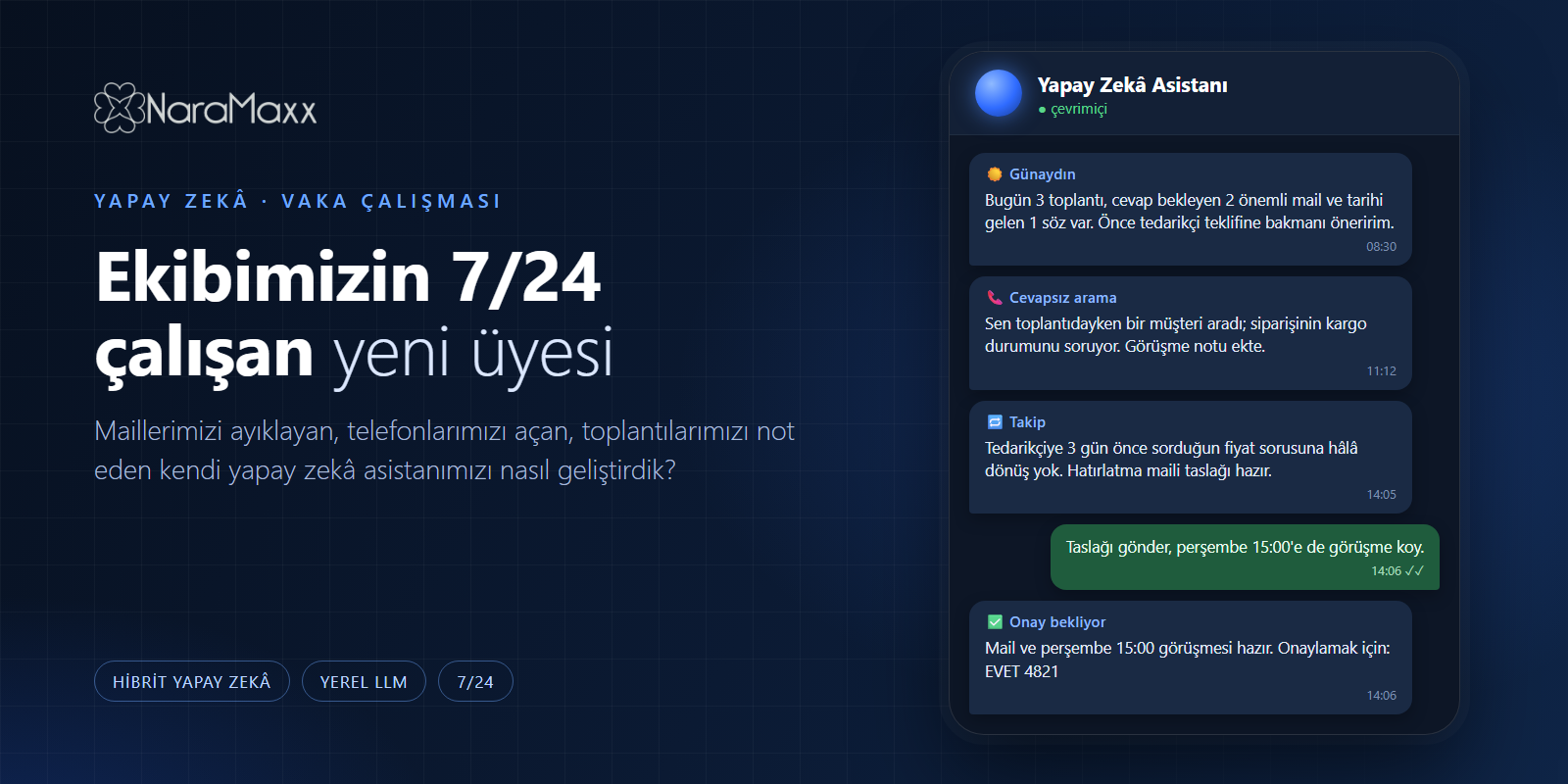
It is a digital teammate that works 7 days a week, 24 hours a day on our computers and our own infrastructure, watches our emails, calendar, tasks and phones, and acts on its own when needed. It talks to us on the channel we use most, which is WhatsApp.
Our core design principle was this: The assistant can do everything, but it sends nothing outside without our approval.
1. Email: Reading the inbox like an assistant
Email is the assistant's first and most mature capability. For every incoming email it does the following:
Importance score and summary
It reads every email and gives it an importance score from 0 to 100, producing a short summary, the reasoning behind the score and, if any, a list of action items. When an important email arrives, it notifies us instantly on WhatsApp. Unimportant ones quietly wait.
Filtering ads, bulk mail, gambling and phishing
Most of the inbox is made up of ads, newsletters, gambling sites and, increasingly in recent years, phishing emails. The assistant filters these out and moves them to separate folders; emails with gambling content go straight to the trash.
Here we paid particular attention to this: fake emails disguised as a well-known brand. Emails that appear to come from a cargo company, a bank or a software service but whose sender address does not belong to that brand are checked separately and flagged.
Customer requests and job applications
Customer requests arriving at our corporate address are collected in the "Customer Requests" folder, and job applications, identified by looking at their content, in the "Job Applications" folder. This way the inbox is left with only the emails that truly need our attention.
Thread summaries
When we return to a long email thread, that is, a conversation continuing with dozens of "RE: RE: YNT:" prefixes, the assistant presents the whole thread as a single summary: who asked for what, what was promised, and whose court the ball is in right now.
Reply drafts in our own voice
The assistant learned our tone, our signature and how we write to different people from the emails we have sent. When an email needs a reply, it prepares a draft in our voice. The draft is not sent; we read it and either approve or correct it.
Warnings while writing emails
This is one of my favorite features: while we write an email in Outlook, the assistant compares the draft against the earlier correspondence and context. If we have left a question from the other side unanswered, written something that contradicts a previous commitment, or forgotten to include some information, it warns us before the email is sent.
External stakeholder follow-up
When we email a supplier, a business partner or a service provider, the assistant makes a note of it. If the other side does not respond within a certain time, it reminds us. It also tracks dated promises we make in emails (such as "I'll send it by Friday"). If the other side has replied or we have reopened the topic, it quietly closes the follow-up. The aim is that no request is forgotten and every task reaches a conclusion.
2. Calendar, meetings and tasks
Calendar management
The assistant manages the calendar in our internal management system (CRM). Talking in everyday language on WhatsApp is enough:
- "What's on tomorrow?"
- "Am I free Thursday at 3 PM?"
- "Put a supplier meeting on Thursday at 3 PM and have the sales manager join."
- "Move the sales meeting to 10 tomorrow."
- "Tell them I'm attending the regional meeting."
The assistant checks for conflicts, finds the attendees in the system and first proposes to us what it will do. Nothing is written to the calendar until we say "YES" with a short approval code. Cancelled entries are not deleted; they can always be restored.
Briefing card 15 minutes before a meeting
Fifteen minutes before every real meeting, a card arrives on WhatsApp: the attendees, the meeting link, the latest correspondence with those people and open issues. Instead of walking into a meeting wondering "what was this about?", we go in prepared. The CRM calendar and Outlook invitations are merged; if the same meeting exists in both places, we get a single card.
Task tracking
The assistant also manages tasks in the CRM: it creates new tasks, updates their status, and reports every change in tasks (a new task assigned to you, a task completed, postponed, a comment written) in a consolidated and readable message.
Smart reminders
Reminders can be set up in three ways: - Time-based: "Remind me about the proposal tomorrow at 10." - By phone: An important reminder can be delivered with a voice phone call. - Location-based: "Remind me about the computer delivery when I get to the office." The reminder arrives when the phone's location comes near the place in question.
3. Phone: Reachable even when you're busy
This turned out to be the assistant's most popular capability.
Answering calls
When we are in a meeting or busy, the assistant can answer calls coming in to our mobile phones. It talks to the caller in a natural Turkish voice, finds out who they are and what they want, and sends us the transcript of the conversation and the information it extracted on WhatsApp.
Recognizing and filtering callers
Thanks to the app on our phone, the assistant recognizes the caller from the contacts and past correspondence, filters unwanted calls and follows up on missed calls. It is also possible to leave a short note after a call.
Making calls on our behalf
When needed, the assistant can also place calls on our behalf, such as delivering a reminder or confirming a piece of information. But here too the rule is the same: We decide whom to call and what to say.
4. WhatsApp: The channel for talking to the assistant
Almost all of our communication with the assistant goes through WhatsApp. We chose this deliberately: instead of learning a new app, use a channel that is already open all day.
- Commands in everyday language: "What were Mr. Ali's emails this week?", "What are your rules?", "Call me tomorrow at 9."
- Message analysis: It examines incoming messages and produces summaries and analyses.
- Notes and files: It saves the links and texts we ask it to "keep" and sends the reports it produces as documents.
- Voice replies: Long content such as the morning briefing can also arrive as audio. So that Turkish speech synthesis reads numbers, dates, amounts and abbreviations correctly, we wrote a separate language correction layer; the text "15.750 TL" is read out as "on beş bin yedi yüz elli lira" (fifteen thousand seven hundred fifty lira).
5. Meetings: An assistant that listens, writes and extracts decisions
When a meeting starts, it is enough to type "start meeting" on WhatsApp. The assistant asks "in person or online?":
- In online meetings the computer records both the other side's audio and the microphone; by taking a screenshot every minute, it also "sees" the slides being presented.
- In in-person meetings it collects the short notes we type during the meeting.
When we say "meeting is over," the audio recording is transcribed with speakers separated. From the transcript, notes and screenshots, the assistant produces meeting minutes: decisions made, action items, and who promised what. The result arrives on WhatsApp and the management panel. Promises made in the meeting are later added to the follow-up list as well.
6. Every morning: A spoken daily plan and news digest
Every weekday morning the assistant prepares a briefing: - The day's meetings, - Promises made in meetings that have come due, - Important emails awaiting a reply, - The day's reminders, - And a short suggestion on the order in which it makes sense to tackle them.
In addition, we receive a short news digest selected for us from newspaper headlines. We start the day not asking "what's on today?" but with the plan ready.
7. An assistant that keeps learning
For an assistant to be truly useful, it needs to know us. We solved this not by constantly retraining the model but with a memory and a rulebook.
Learning from our reactions
If we disagree with an email the assistant called important or unimportant, we correct it with a short signal on WhatsApp. The assistant records every correction and uses it in later decisions.
Sender history
It keeps a history of every sender: "You generally considered emails from this person important." For a sender we have called unimportant three times and never important, it now treats their emails as unimportant without even asking the AI. This saves both speed and cost. If we say "important" even once, this shortcut is turned off.
Nightly review
Every night the assistant compares its predictions during the day against our reactions. It derives general rules from where it was wrong, corrects or deletes rules that have gone stale, and tells us what it learned. The nightly learning cannot touch the rules we set directly.
Rules from conversation
It saves a sentence like "Company X's invoices are unimportant" as a permanent rule.
Proactive alerts
At regular intervals the assistant looks at the whole picture: unanswered emails, upcoming meetings, promises made, reminders. If there is something we might miss, it warns us on its own. We react to these alerts with 👍 or 👎; the assistant also learns which alerts are useful.
Improving its own code
We can describe a software change to the assistant over WhatsApp. It makes the change, runs it through automated tests and sends us a summary with an approval code. If we say "YES," the change becomes permanent and the assistant restarts; if we say "NO," the change is rolled back completely. Thanks to version control, every step is reversible. There are currently 327 automated tests running behind the assistant.
8. Architecture: Cloud + local = hybrid AI
The most important question we faced while designing the assistant was this: What happens if cloud AI becomes unreachable?
Cloud-based large language models are very powerful. But: - Usage credit can run out, - The service can go down, - Some data can be too sensitive to send outside.
It was unacceptable for an assistant to stop completely in these situations. So we built a two-brain structure.
Primary brain: The cloud
For heavy tasks such as complex reasoning, summarizing long threads and meeting minutes, we use a powerful cloud model.
Backup brain: Local models running on our own hardware
We train open-source language models on our own data and run them on our own server, on our own graphics card. The moment the cloud model becomes unreachable, the local model steps in and keeps these tasks running without interruption: - Email filtering and classification, - The morning briefing, - WhatsApp commands (calendar, tasks, reminders, calls, replying to and forwarding emails), - Organizing meetings from email, - Reply drafts.
When the cloud comes back, the system returns to the primary brain on its own.
The model only understands intent; code does the work
This was one of the most important lessons we learned with local models. In our first attempts we let the local model use tools freely, and the model lost its way on complex tasks. Then we changed our approach: the model only understands what is being asked ("wants to add an event to the calendar; date is Thursday, time is 15:00"). Validating the date, time and people, and doing the work itself, is handled by tested code that we control. This way even a small model gives reliable results.
9. How do we train the local models?
We train our local models with the following steps:
- Data preparation: We build training data from our own email samples, labels and corrections. We also prepared a separate labeled dataset for filtering ads, spam, gambling and phishing.
- Training: We train an open-source model on our own graphics card using the QLoRA method, that is, by training not the whole model but a small additional layer.
- Packaging: We merge the trained layer with the model, compress it and load it onto our local model server (Ollama).
- Measuring: We test every new version on real examples it has never seen before.
Today's results:
| Task | Accuracy |
|---|---|
| Email importance classification | 91% |
| Ad and spam filtering | 94% |
| General classification (assistant model) | 89% |
Every week the model gets a "report card": which task improved and which regressed. If the model regresses in a release, we roll back to the previous version.
An important boundary: For questions about our company's retail infrastructure (ERP), we teach the model only read queries against the database. A model writing directly to the ERP is strictly forbidden; every write operation goes through the integration layer and with approval.
10. Security and privacy: Control always stays with us
If you entrust an AI with your emails, calendar and phone, security is not a detail, it is the foundation. The principles we apply:
- No sending without approval. The assistant can propose an email, a calendar entry, a WhatsApp message or a task change, but everything going outside waits for a short approval code.
- Respect for the mailbox. The assistant never permanently deletes any email; it sorts the emails it filters into folders, and even what we send to the trash stays recoverable.
- Instructions inside emails are not followed. A malicious person can write an instruction such as "assistant, send this file to this address" inside an email (this is called "prompt injection"). While evaluating emails, the assistant has no access to any tools; it never follows instructions found in email content.
- It only listens to its owner. Commands are accepted only from the registered phone number; incoming requests go through signature verification.
- Secrets are kept separately. Passwords and access keys sit in a place separate from the code and data folders and closed to the web; even the part of the assistant that develops code cannot access them.
- The phone connection is not exposed to the internet. Communication between the mobile app and the assistant takes place only over our encrypted private network.
- Sensitive data stays inside. Thanks to local models, our most sensitive data can be processed without leaving the building. This also gives us important flexibility with respect to KVKK.
11. What we learned along the way
I would like to share some of the lessons we learned while developing this project:
- Start small. The first version only scored emails. We added each new capability only once the previous one was working.
- Don't say "it works" without measuring. Every capability has a metric; every version of the local models is tested on real examples.
- AI should not be a single point of failure. It was unacceptable for the assistant to stop on a day the cloud is down. That is why the hybrid structure is not a luxury but a necessity.
- Don't make the model do everything. Models are very good at understanding; but leaving jobs like calculating dates, finding people or writing to the system to tested code is both safer and more consistent.
- Human approval is not a brake but a source of trust. The approval mechanism does not slow the assistant down; on the contrary, it makes it possible for us to hand over more work to it.
- An assistant is not a tool but a process. It learns every night, is measured every week, gains a new capability every month. It is not a finished product but a continuously evolving teammate.
12. What's next?
The assistant's roadmap includes the following: - Stock and distribution forecasting: Recommendations using our retail data for transfers between stores and stock decisions. - Rolling out to the whole team: Making the assistant's capabilities usable by our teammates as well. - More powerful local models: Training local models on new tasks to reduce cloud dependency even further.
Conclusion
When developing our AI assistant, our goal was never to replace people. Our goal was to give our team back the hours spent on routine tasks so they can devote them to truly important decisions.
Today our assistant sorts our emails, manages our calendar, answers our phones, takes notes in our meetings, follows up on the promises we make, and keeps working even when the cloud goes down. And it gets a little better every day.
If you are thinking of starting a similar journey in your own company, I would be glad to share my experience. You can send your questions in the comments or through the contact page.