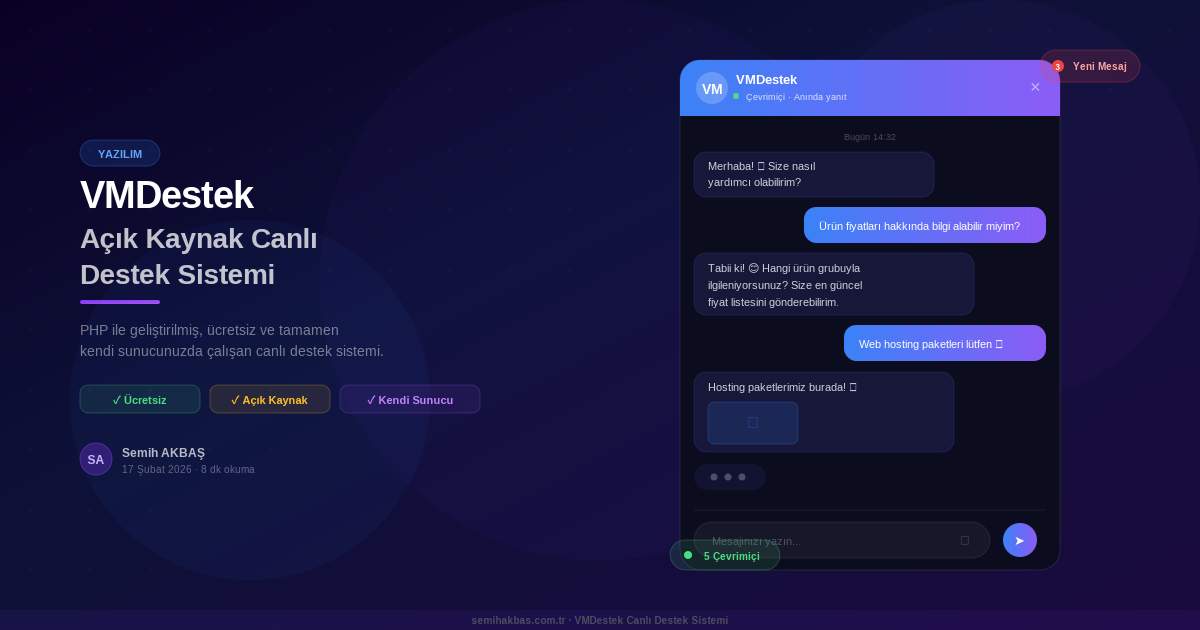
Today, communicating instantly with website visitors has become one of the most critical determinants of customer satisfaction and conversion rates. However, most live support solutions on the market either demand high monthly subscription fees or raise privacy concerns by hosting your data on their own servers. This is exactly where VMDestek comes in.
VMDestek is a completely free, open-source live support system built entirely with PHP. You can host it on your own server, customize it however you like, and integrate it into your website with a single line of code.
What Is VMDestek?
VMDestek is a comprehensive live support solution designed for website owners and businesses. It lets you chat with your visitors in real time, track active users on your site, and deliver a professional customer service experience.
The system consists of two main components:
- Chat Widget: A sleek, modern interface embedded in your website through which visitors contact you
- Admin Panel: The central control panel where you manage all conversations, track visitors and configure the system
Why Choose VMDestek?
🆓 Completely Free and Open Source
VMDestek requires no license fee or monthly subscription. The source code is fully open on GitHub. You can inspect it, modify it and use it in your own projects as you wish. There is no charge even for commercial use.
🔒 Host It on Your Own Server
Unlike third-party live support services, VMDestek runs entirely on your own server. This way:
- Your customer data stays under your control
- You can easily ensure KVKK and GDPR compliance
- Third-party dependency is eliminated
- You are not affected by outages of external services (if you are on the same server)
⚡ Easy Installation
VMDestek comes with a web-based setup wizard. Upload the files to your server, open the setup page in your browser and enter your database details — the system is ready to run within minutes.
Key Features
💬 Real-Time Chat
The heart of VMDestek, the real-time chat feature enables instant messaging between the visitor and the admin. Messages are delivered instantly, read receipts are shown, and typing indicators provide a professional experience.
👥 Live Visitor Tracking
From the admin panel, you can watch the active visitors on your site live. You can see which page each visitor is on, their browser information and session duration. This feature is a big advantage especially for e-commerce sites — you can get to know your potential customers and offer proactive support.
🎨 Customizable Widget
The chat widget can be fully customized to match your site's design:
- Primary color and gradient settings
- Company name and welcome message
- Widget position (left/right)
- Logo and icon changes
- Dark/light theme options
📝 Notes and Reminders System
You can add custom notes to each conversation and set reminders for future follow-up. This feature is ideal for managing customer relationships and making sure no request is missed.
⚡ Canned Responses
You can send pre-prepared answers to frequently asked questions with a single click. This saves time and delivers a consistent customer experience. You can define as many canned responses as you like from the admin panel.
🔔 Notification System
You get a sound notification when a new visitor message arrives. This way, even if you are working in a different tab, you never miss a message.
📱 Responsive Design
Both the chat widget and the admin panel have a fully responsive design. They can be used seamlessly on mobile devices, tablets and desktop computers.
🖼️ Image Sharing
Visitors and admins can send images within the chat. This is extremely useful for sharing screenshots in technical support scenarios or for product images.
🔄 Automatic Updates
You can update with a single click from the admin panel. When new versions are released, the system notifies you and manages the update process automatically.
Technical Infrastructure
| Feature | Detail |
|---|---|
| Programming Language | PHP 7.4+ |
| Database | MySQL / MariaDB |
| Frontend | HTML5, CSS3, Vanilla JavaScript |
| Real-Time Communication | AJAX Polling / Long Polling |
| File Size | ~2 MB |
| License | MIT (Free) |
| Source Code | Open Source on GitHub |
Installation Steps
Installing VMDestek on your own server is extremely simple. Here is the step-by-step installation process:
1. System Requirements
- PHP 7.4 or higher
- MySQL 5.7+ or MariaDB 10.3+
- Apache or Nginx web server
- mod_rewrite enabled (for Apache)
2. Upload the Files
Download the VMDestek files and upload them to your web server's root directory or a subdirectory.
3. Setup Wizard
Go to siteadresiniz.com/install.php in your browser. The setup wizard will guide you step by step:
- Enter your database connection details
- Create your admin user credentials
- Configure the basic settings
- Complete the installation
4. Widget Integration
Once the installation is complete, you can activate the live support widget by adding a single-line script to your website like the one below:
<script src="https://destek.siteadresiniz.com/embed.js"></script>That's it! The widget will automatically appear in the bottom right corner of your site, and your visitors will be able to contact you instantly.
A Look at the Admin Panel
The VMDestek admin panel has a modern, user-friendly interface. Here is what you can do from the panel:
- Dashboard: View statistics on total conversations, active visitors and messages
- Live Chats: Manage active conversations and message instantly
- Visitor Tracking: Watch active visitors on the site live
- Canned Responses: Create and edit frequently used replies
- Widget Settings: Customize colors, gradient, logo and welcome message
- Note Management: Add notes to conversations and set reminders
- Updates: One-click automatic updates
Who Is It For?
VMDestek appeals to a wide range of users:
- E-Commerce Sites: Offer your customers instant support during the shopping process and reduce the abandoned cart rate
- Corporate Websites: Communicate professionally with your visitors
- SaaS Products: Provide quick technical support to your users
- Freelancers: Create added value by easily integrating it into your clients' websites
- Education Platforms: Offer instant help to your students
- Blog and Content Sites: Engage with your readers
Comparison with Competitors
| Feature | VMDestek | Tawk.to | Zendesk Chat | LiveChat |
|---|---|---|---|---|
| Price | ✅ Free | Free (with ads) | $55/mo | $20/mo |
| Open Source | ✅ Yes | ❌ No | ❌ No | ❌ No |
| Self-Hosted | ✅ Yes | ❌ No | ❌ No | ❌ No |
| Data Control | ✅ Full control | ❌ Limited | ❌ Limited | ❌ Limited |
| Customization | ✅ Unlimited | Limited | Medium | Medium |
| Visitor Tracking | ✅ Yes | ✅ Yes | ✅ Yes | ✅ Yes |
Frequently Asked Questions
Is technical knowledge required to install VMDestek?
Basic web hosting knowledge is enough. The setup wizard guides you step by step. It runs on any hosting that supports PHP and MySQL.
Is it compatible with WordPress?
Yes! VMDestek is compatible with any website. WordPress, Joomla, Drupal, static HTML sites or custom PHP projects — you can integrate it with a single line of script code.
How many visitors can I chat with at the same time?
You can chat with an unlimited number of visitors simultaneously. Performance depends on your server's capacity.
Can I manage it from mobile devices?
Yes, the admin panel has a fully responsive design. You can use all of its features from your phone's browser.
How do I update it?
You can update with a single click from the "Update" section of the admin panel. The system automatically downloads and installs the new version.
Open Source on GitHub
All of VMDestek's source code is available on GitHub. You can contribute to the project, report bugs or create your own fork:
🔗 GitHub: github.com/Sem-h/VMDestek
Conclusion
VMDestek offers an ideal solution for anyone who wants to add a professional live support system to their website. With its free price, open-source nature, self-hosting option and comprehensive features, it is a strong competitor to the paid alternatives on the market.
If you want to communicate instantly with your customers, track visitor behavior and increase your conversion rates, I highly recommend giving VMDestek a try.