About the Project
An executive's day is rarely filled with big decisions; it is filled with small tasks: hundreds of e-mails, a phone ringing during a meeting, a question asked a week ago and still unanswered, a promise made but never written down. None of them is hard on its own; together they melt away the most productive hours of the day.
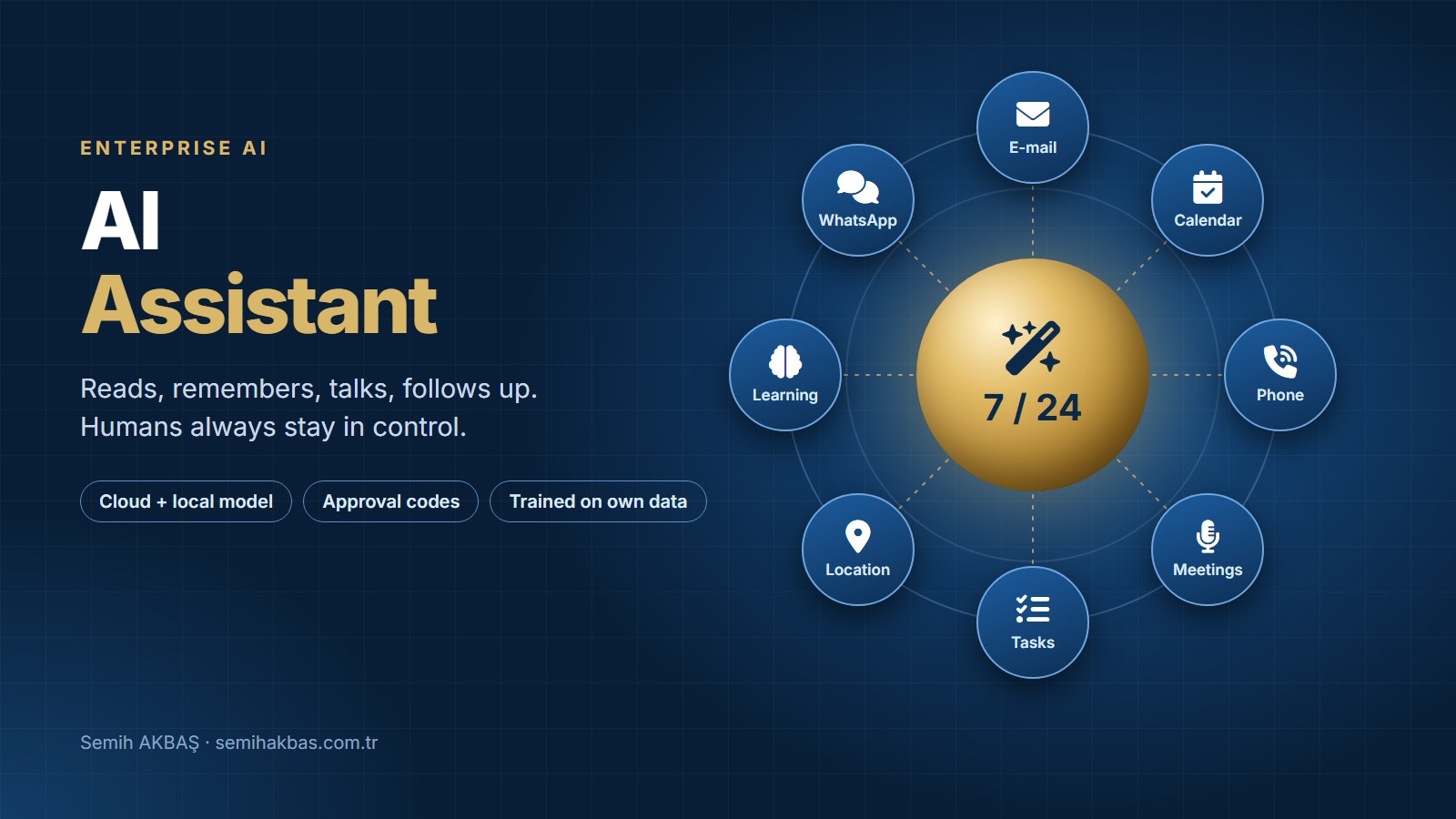
The AI Assistant is a digital teammate that works around the clock, built together with our team at NaraMaxx to take over this work. It is not a chatbot in the corner of a website: it watches e-mail, calendar, tasks, phone and meetings by itself, speaks up when needed, prepares the work and submits it for approval. It combines a powerful cloud model with a local model that runs on our own graphics card and is trained on our own data, so it keeps working even when the cloud is down.
Highlights
- One channel, everyday language: No new app to learn; you work with the assistant by writing or speaking on WhatsApp.
- Proactive: It does not wait to be asked; it reports the important mail, the forgotten promise and the upcoming meeting by itself.
- Two-brain (hybrid) architecture: The cloud model and the local model back each other up.
- It learns: It stores every correction, reviews itself every night and retrains its local model on its own data.
- Humans stay in control: Calendar, mail and task changes arrive as proposals first and are applied with a one-time approval code.
- Built in-house end to end: Core service, management panel, WhatsApp bridge, voice call bridge and Android app.
E-mail: Reads, Sorts, Follows Up
- Importance score: Every mail is scored from 0 to 100, with a short summary, the reason for the score and a to-do list. Important ones are reported instantly.
- Mail guidance: It says what a mail is about and what to do: reply, act, forward, follow up, schedule or just be informed. Open items are listed in the morning.
- Filtering: Ads, bulk mail, gambling and phishing are separated; fake sender addresses posing as well-known brands are checked separately. Webinar and event invitations do not get lost.
- Foldering: Customer requests and job applications go to their own folders based on content.
- Thread summaries: In long threads you see at a glance who asked for what, what was promised and whose turn it is.
- Drafts in your voice: Reply drafts use the style and signature learned from sent mail; sending remains the user's decision.
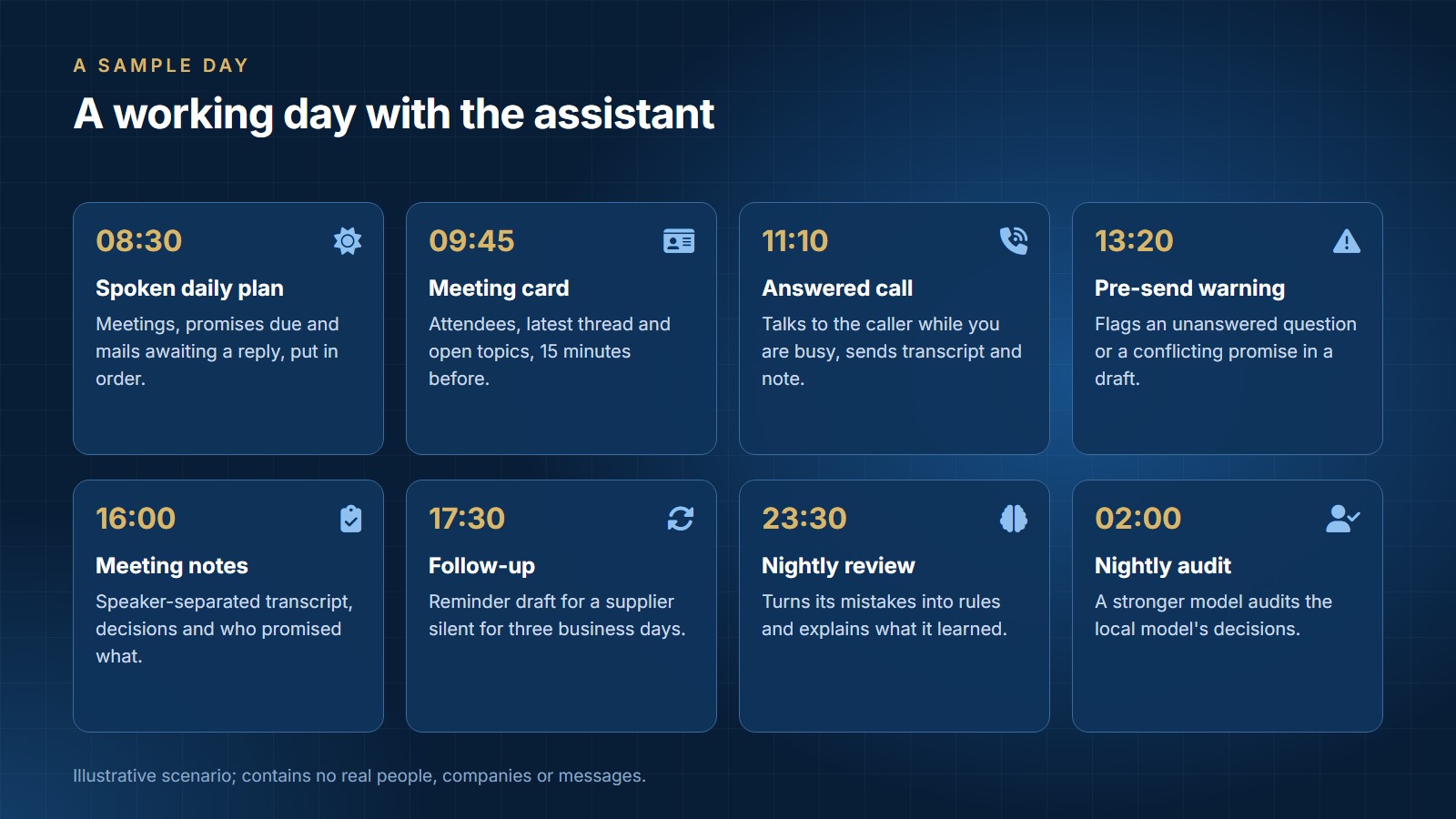
- Pre-send warning: It compares the draft written in Outlook with the earlier thread and points out unanswered questions, conflicting promises and missing information.
- External follow-up: It reminds you if the other side has not replied within three business days and tracks dated promises such as "I will send it by Friday". If a reply arrives or the topic is reopened, the follow-up closes quietly.
- Its own mailbox: When added to a thread in To or CC, it follows the topic and reports developments.
Calendar, Tasks and Reminders
- CRM calendar: Works with sentences like "Am I free Thursday at 15:00?" or "Move the sales meeting to 10 tomorrow"; checks conflicts, finds attendees, shows the old and new time and asks for approval. Records are not deleted, and cancellations can be undone.
- Meeting organization: Finds people in the directory, asks attendees for available times, collects replies, proposes the best date, opens an online meeting room and prepares the invitation.
- Meeting card: 15 minutes before a meeting you get the attendees, the link, the latest correspondence with them and open topics. CRM and Outlook entries merge into one card.
- Task tracking: Creates and updates tasks, and reports new tasks, comments, postponements and completions in one readable message.
- Three kinds of reminders: Time-based, by phone call, or location-based ("remind me when I reach the office").
Phone and Voice Calls
- Natural two-way conversation: It answers calls in natural Turkish when you are busy and handles interruptions and turn-taking; when the call ends, the transcript and extracted information arrive on WhatsApp.
- Caller recognition: While the phone rings it shows the last mail, meeting and call note about the caller, and filters unknown calls by rules.
- After the call: A short note is taken and a reminder set if needed; missed calls from known people go to a "call back" list.
- Calling on our behalf: It can call to confirm information or pass on a reminder; a human decides who is called and what is said.
- Turkish speech layer: Numbers, dates, amounts and abbreviations are read out correctly in Turkish.
Meetings
- Online meetings: The other side's audio and the microphone are recorded together, and screenshots of presented content add context to the notes.
- Face-to-face meetings: Short written notes are collected; audio can be recorded with the phone. Questions asked during the meeting are answered right away.
- Meeting notes: Decisions, to-dos and who promised what are extracted from a speaker-separated transcript; promises are added to the follow-up list.
Morning Plan, News Bulletin and Proactive Alerts
- Briefing: The day's meetings, promises due, mails awaiting a reply and a short suggestion on the order to handle them; written or spoken.
- News bulletin: A short personalized summary from newspaper headlines.
- Thinking loop: At regular intervals it looks at the whole picture and warns about anything that might be overlooked. 👍 and 👎 reactions shape future alerts.
- Web research: Searching and reading pages is the code's job, deciding is the model's. If a number in the answer appears in no source, that sentence is dropped; source addresses are written by code, not by the model.
Technical Architecture
The key design question was: what happens when cloud AI is unreachable? Credits may run out, the service may go down, and some data may be too sensitive to leave the building. The answer was two brains that back each other up and a tested core that is independent of both.
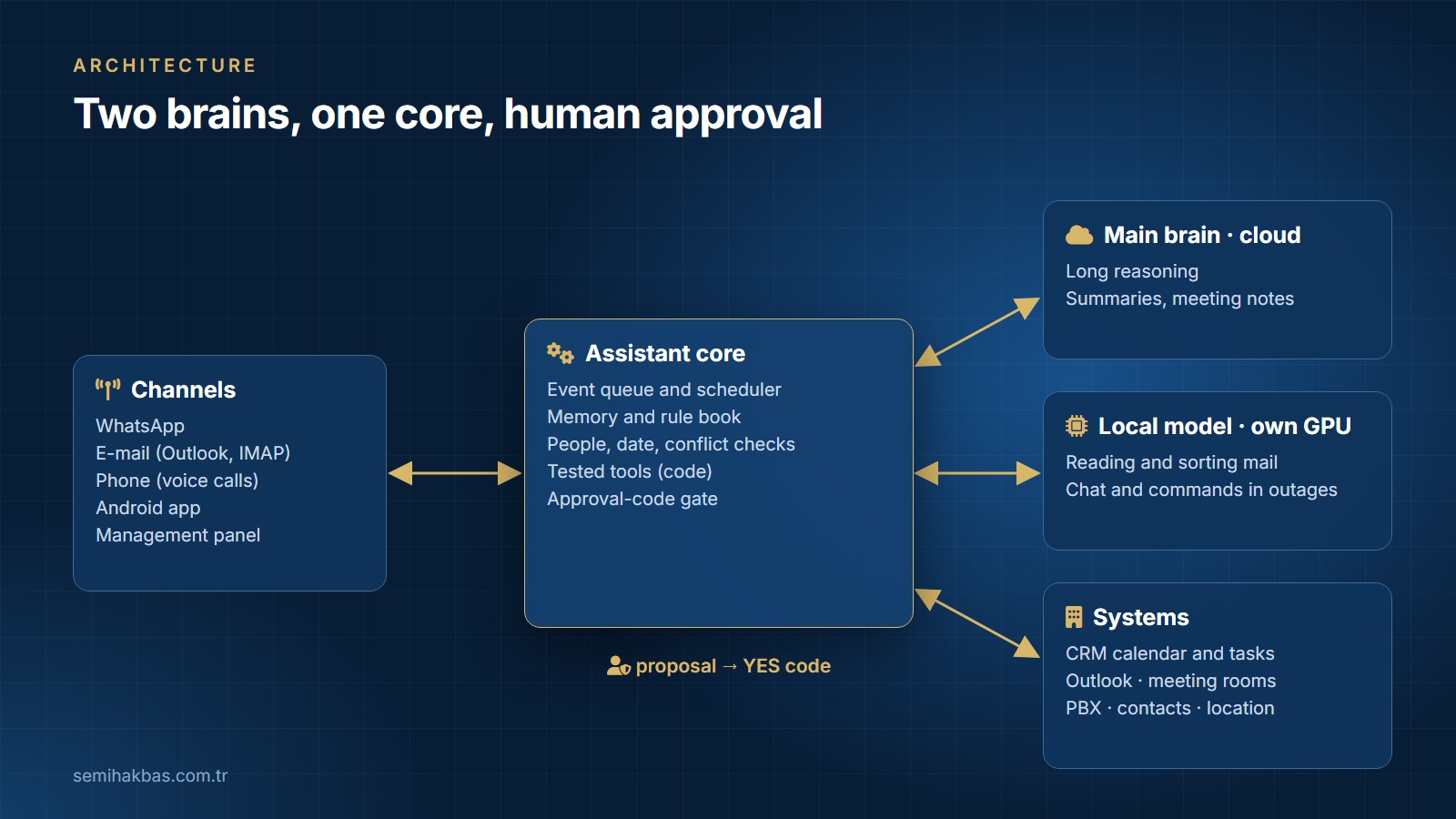
- Core service (Python): Event queue, scheduler, mail and calendar watchers, the approval gate and all tools in a single service; memory, rules and journal in MySQL.
- Main brain: A cloud language model for heavy work such as long reasoning, summaries and meeting notes. Caching and a "do not think if nothing changed" rule keep costs low; spending is tracked per type of work.
- Local model: Runs on Ollama on our own graphics card. It reads and classifies mail locally; when the cloud is down it takes over chat, calendar, tasks, reminders and directory search. When the cloud returns, the system switches back by itself.
- The model understands, the code acts: A small model lost its way with free tool use. Now it only extracts what is being asked; validating dates, people and conflicts and doing the work belong to code. The answer is the tool's own output, so nothing is made up.
- Android app: React Native and Kotlin; written and voice commands, meeting recording, call filter and location-based reminders. Unlocked by fingerprint or face, paired by QR and revocable remotely.
- Management panel: Mails, proposals, chat with the local model and comparison with the cloud model on one screen.
| Work | With the cloud | Without the cloud |
|---|---|---|
| Reading and sorting mail | Local model, cloud when needed | Local model |
| WhatsApp chat and commands | Cloud model | Local model and code |
| Calendar, tasks, reminders | Code and approval | Code and approval |
| Morning briefing | Cloud model | Local model |
| Long reasoning and meeting notes | Cloud model | Completed when the cloud returns |
Learning and Local Model Training
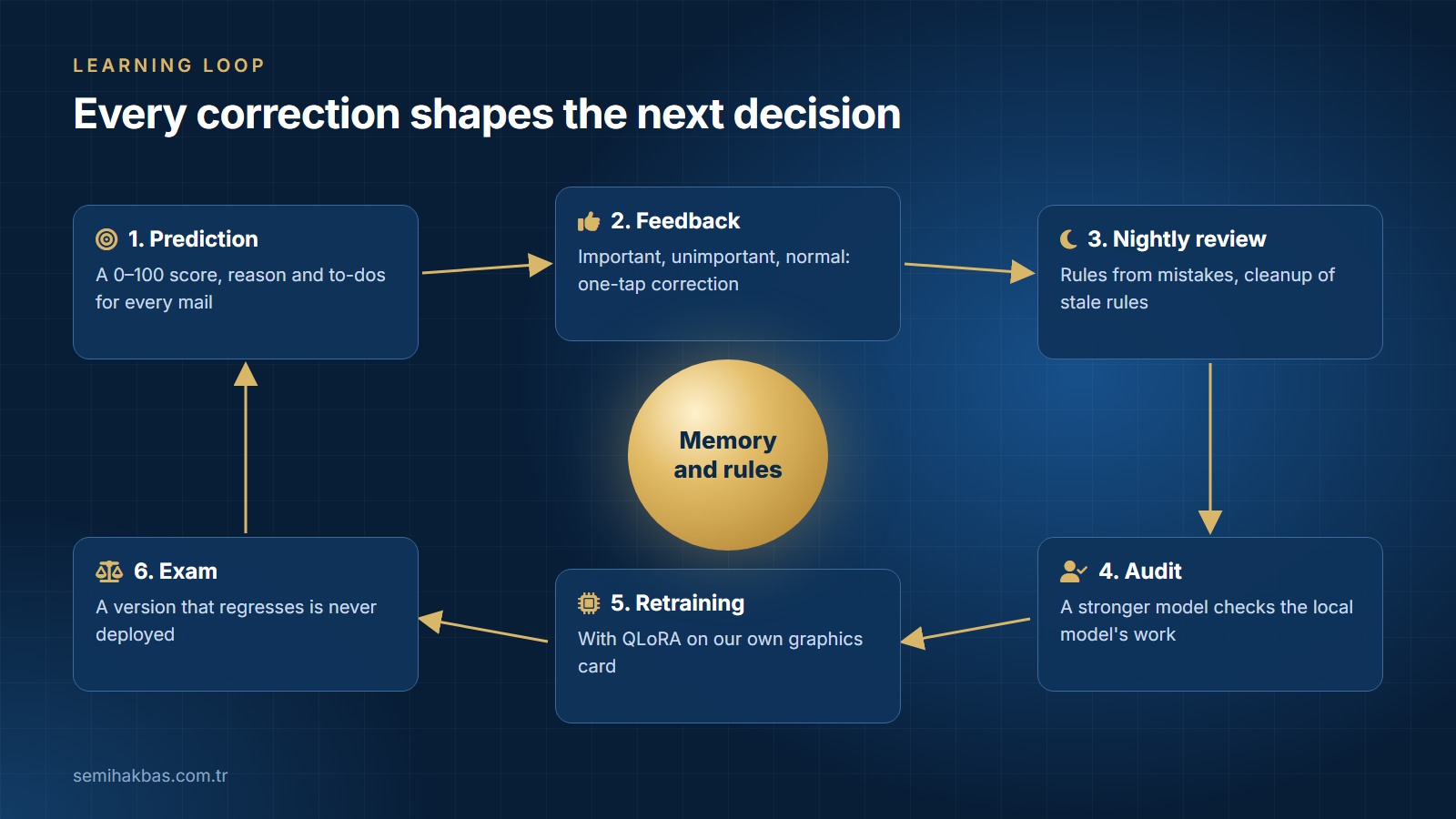
- Memory and rule book: Every correction is stored; sender history and similar examples are used in the next decision. A sender marked unimportant three times is no longer sent to the model at all.
- Nightly review: Predictions are compared with reactions, mistakes become rules and stale rules are cleaned up. Rules set by the user are never touched.
- Manager and worker: The local model works, a stronger model audits its work every night, and mistakes become training data.
- Training with QLoRA: Instead of the whole open-source model, a small additional layer is trained on our own graphics card. Separate datasets are prepared for mail, calendar, directory, command understanding, math and SQL reading skills.
- Exam gate: Each new version is tested skill by skill on examples it has never seen. A version that regresses is not deployed; the previous one keeps running.
- ERP boundary: For retail data the model is taught read-only queries; writing directly to the ERP is forbidden.
Security and Privacy
- Approval code: Calendar, task and mail actions arrive as proposals and are applied with a one-time code. The few flows that run without a code are limited to the owner's own explicit written instruction or a predefined fixed text.
- Protection against prompt injection: Sentences such as "assistant, do this" in mails and web pages are read as data; during classification the model has no tools at all.
- Listens only to its owner: Commands are accepted from a defined number and incoming requests are verified by signature.
- Data minimization: Addresses, phone numbers, people, company names and document numbers are removed from searches it starts by itself; if nothing meaningful is left, no search is made. Work without personal data is routed to a separate model.
- Secrets kept apart: Access keys are kept separate from code and data; the part that writes code cannot read them.
- On-premise processing: Thanks to the local model, sensitive content can be processed without leaving the building, which adds flexibility for data protection compliance.
- Reversibility: Mail is never permanently deleted, cancelled calendar entries can be restored and code changes are under version control.
Software That Improves Itself
A software change can be described to the assistant on WhatsApp. A coding agent makes the change, more than 300 automated tests run, and a summary with an approval code arrives. If approved, the change is committed and the service restarts; if rejected, it is fully rolled back. Tests run with fake services and a separate database and never touch real mail, calendar or WhatsApp.
What We Learned
- Start small: The first version only scored mail; each ability was added once the previous one proved useful.
- Never say "it works" without measuring: Every local model version takes an exam.
- Leave no single point of failure: Work must not stop when AI is unavailable.
- Do not make the model do everything: Understanding is the model's job, execution belongs to tested code.
- Treat approval as trust, not a brake: The approval mechanism makes it possible to delegate more.
Roadmap
- Recommendations based on retail data for store-to-store transfers and stock decisions
- Opening the assistant's abilities to the wider team
- Training the local model on new tasks to reduce cloud dependency
The story of the project and its measurements: The New 24/7 Member of Our Team