About the Project
In a data center, hundreds of customer servers reach the internet through the same core switch. When one of these servers comes under attack, is compromised and starts sending spam, or becomes a tool for an amplification attack, the impact is not limited to that customer: the line fills up, the IP block lands on blocklists, and other customers' emails are not delivered.
Traffic Protection and NOC Panel is a network security platform that analyzes the traffic coming from the data center's core switch in real time, detects abnormal behavior and writes the necessary rule directly to the switch hardware. The network operations team (NOC) sees from a single screen which IP generates how much traffic, who it is talking to, what is flowing through which port and who is sending spam; with one click they cut internet access, close a port, set a rate limit or block outbound traffic to a specific destination.
Highlights
- Hardware-level protection: Rules are written not to the server firewall but to the switch's uplink filters; harmful traffic stops before it reaches the customer server or leaves the network.
- Automatic response: An IP that exceeds the threshold is cut off automatically for a set period; the SMTP egress of an IP that gets blocklisted or sends mail at a suspicious volume is closed automatically.
- Real-time visibility: Flow, port, mail and country-based analysis within seconds from sFlow samples.
- Evidence-based communication: Every cut-off made to a customer is reported with text and visual evidence generated from real records.
- Safe operation: The panel does not connect to the switch directly; every action passes through a single audited command queue and is verified with the switch's counters.
Live Monitoring
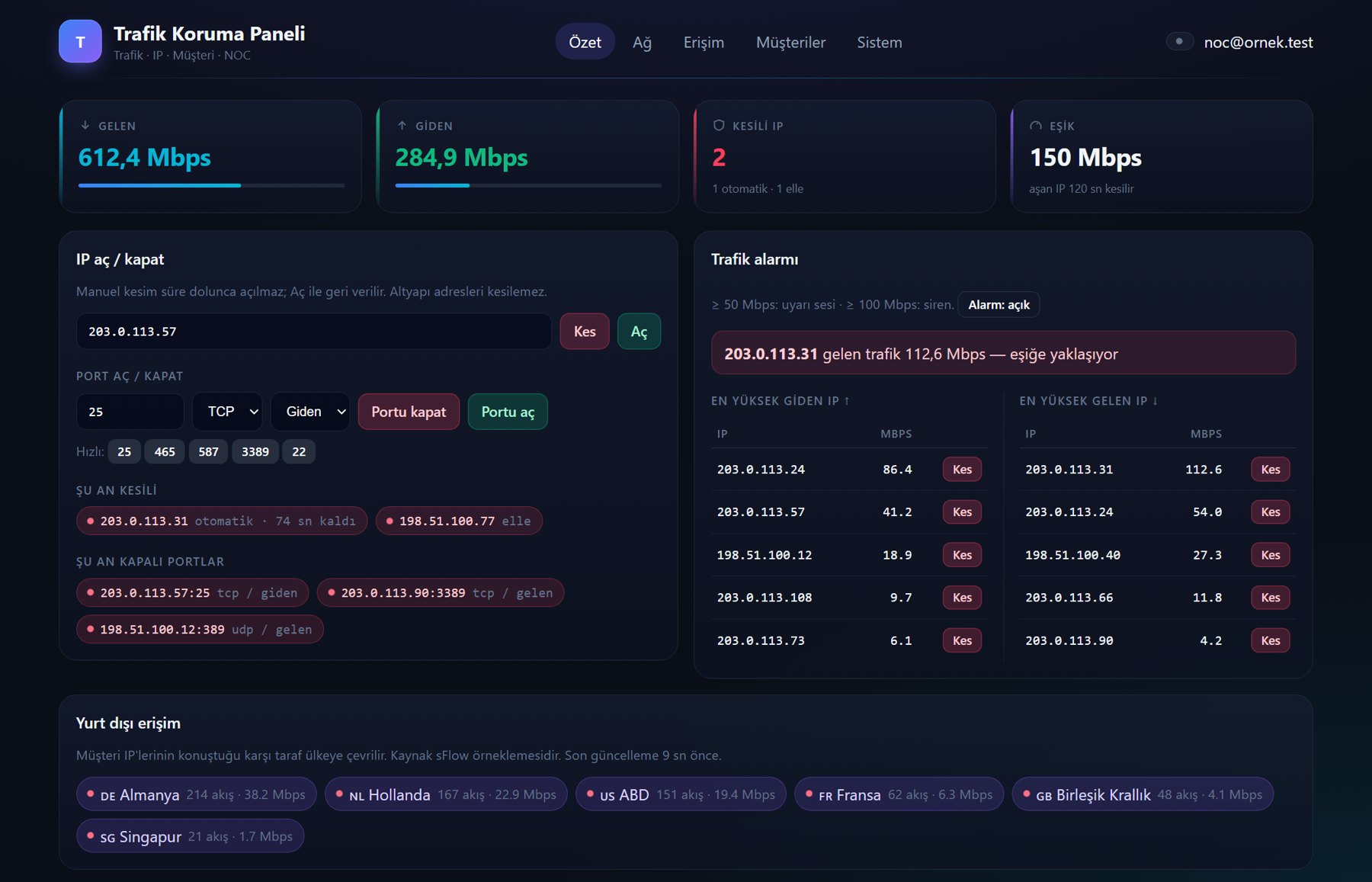
- Live traffic: Total inbound and outbound bandwidth of the network, the IPs generating and receiving the most traffic, Mbps per IP.
- Traffic alarm: A warning sound above 50 Mbps and a siren above 100 Mbps; even an operator who is not at the NOC screen notices the attack.
- Time series and subnet view: Traffic over time, distribution by subnet, SMTP volume and top sending IPs.
- NOC screen: A self-refreshing live monitoring page designed to stay open continuously on a wall display.
- Foreign access: The remote parties that customer IPs talk to are converted to countries with GeoIP; connections outside Turkey are listed by country, flow count and volume. Heavy connections to an unexpected country are an early sign of a compromised server.
- Cut-off history: Which IP was cut off how many times, when, at what rate and why.
Access Control
- Internet cut / restore: Completely cuts an IP's internet access with one click. Automatic cut-offs are restored on their own when the time expires; a manual cut-off is only restored manually.
- Port ban: Rules per IP and port, with TCP / UDP / both and inbound / outbound / both-direction options. Quick buttons for commonly used ports such as 25, 465, 587, 3389 and 22.
- Rate limit: A Mbps ceiling per IP; for situations where traffic needs to be limited without cutting it off.
- Destination blocking: Blocks outbound traffic from the entire network to a specific external IP or subnet; for command-and-control servers and attack targets.
- Port query: The ports listening on a customer server are scanned and combined with the switch rules so that "listening" and "reachable from outside" are shown separately.
- Protected addresses: Addresses critical to the infrastructure's operation can never be cut off under any circumstances; selected IPs can be exempted from automatic cut-offs.
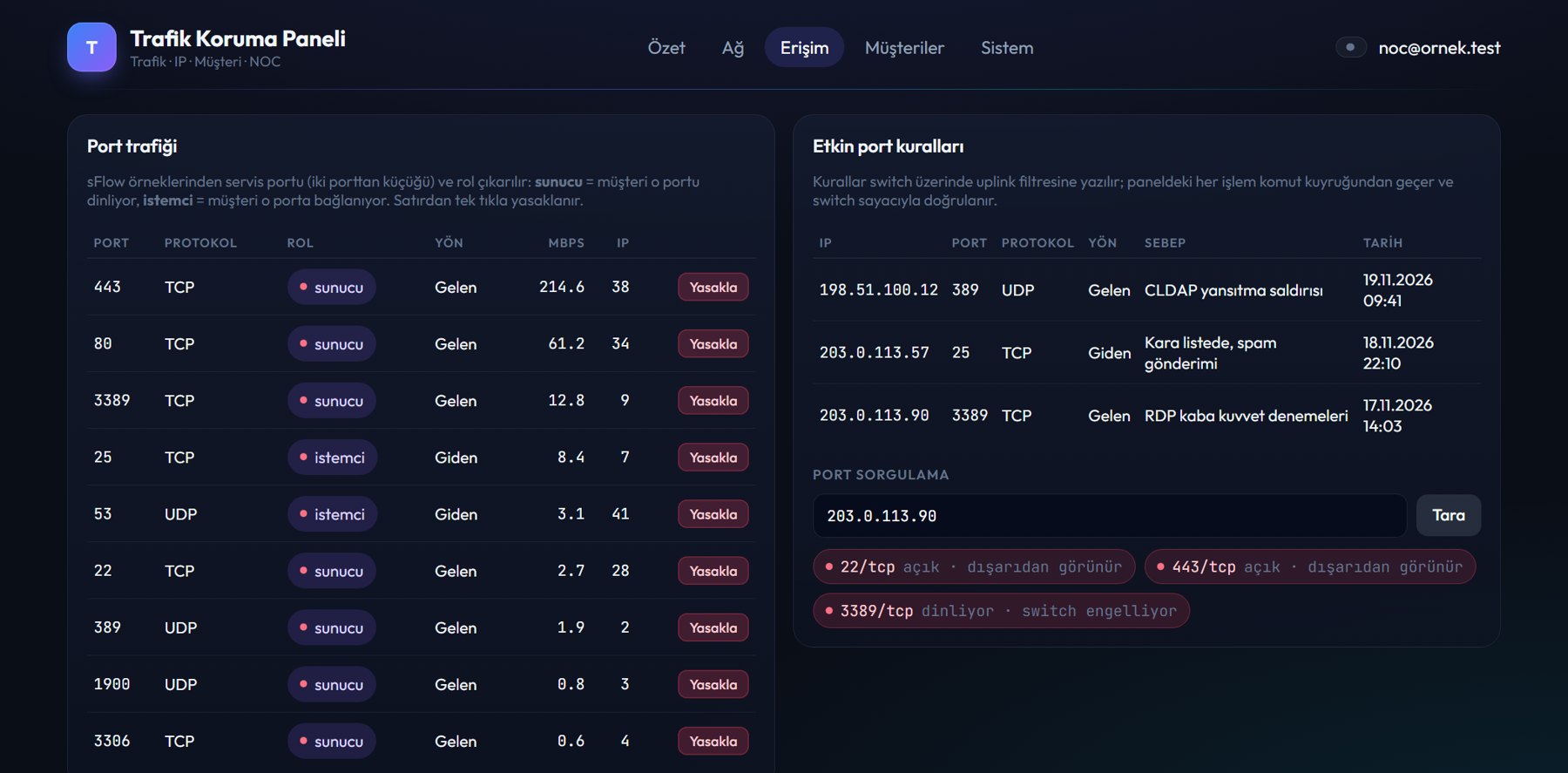
Port Traffic Analysis
A connection has two ends, and blindly taking the destination port fills the table with ephemeral ports. For every flow, the panel determines the service port (the smaller of the two ports) and separates the customer's role:
- Server role: The customer is listening on that port; the direction to ban is inbound traffic (e.g. RDP or CLDAP exposed to the outside).
- Client role: The customer is connecting to that port; the direction to ban is outbound traffic (e.g. sending SMTP to the outside).
- A ban rule is created from any row with one click; active rules and their history are monitored on the same screen.
SMTP and Spam Management
- Sending IPs: Customer IPs that send mail out through ports 25 / 465 / 587, and their hourly volumes.
- Envelope analysis: SMTP envelope information (sender, recipient domain) is extracted from sFlow samples; spam behavior becomes visible without reading the content.
- Blocklist check: The IPs in the network are queried against the major DNS blocklists every 30 minutes.
- Automatic spam cut-off: The mail egress of an IP that newly lands on a blocklist or exceeds the suspicious threshold is closed automatically. Existing senders are exempted with an initial list; the system intervenes only on new detections.
- Evidence for the customer: The justification for the cut-off is generated as text and PNG from real envelope records; the notification to the customer is sent with one click.
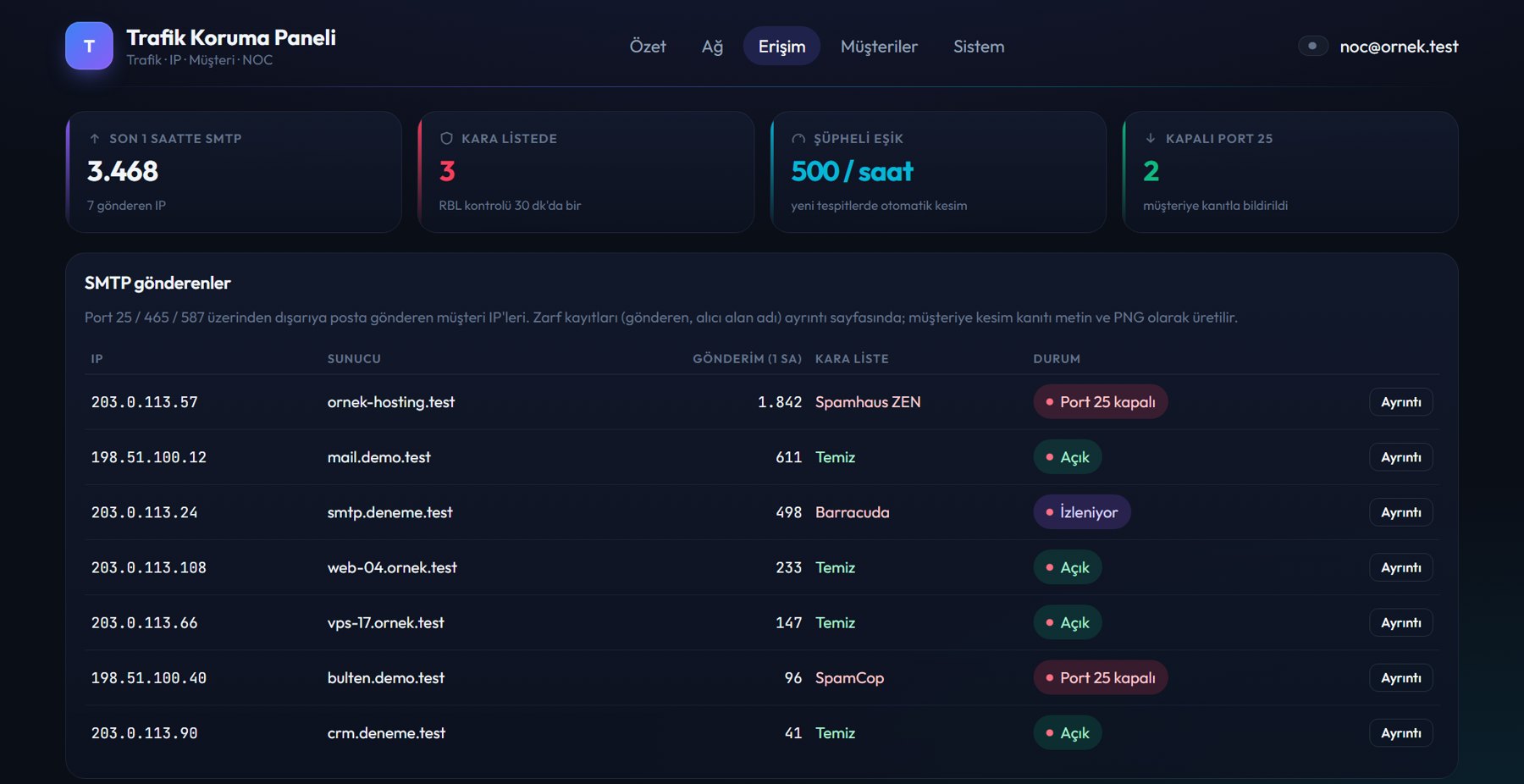
The screens were prepared with entirely fictional data; the IP addresses are sample ranges reserved for use in documentation and contain no real customer or infrastructure information.
Network and Customer Management
- Servers: From the switch's MAC table, the number of IPs each physical / virtual server uses is derived; unauthorized IP usage becomes visible.
- IPAM: A map of free and used IPs in subnets.
- IP management: Notes, exemptions and registration details for each IP.
- WHMCS integration: IPs are matched with customers and services in WHMCS; which customer a cut-off IP belongs to is seen instantly.
- Cut-off notification: An attack report email to be sent to the NOC and relevant parties is prepared from real cut-off records.
Technical Architecture
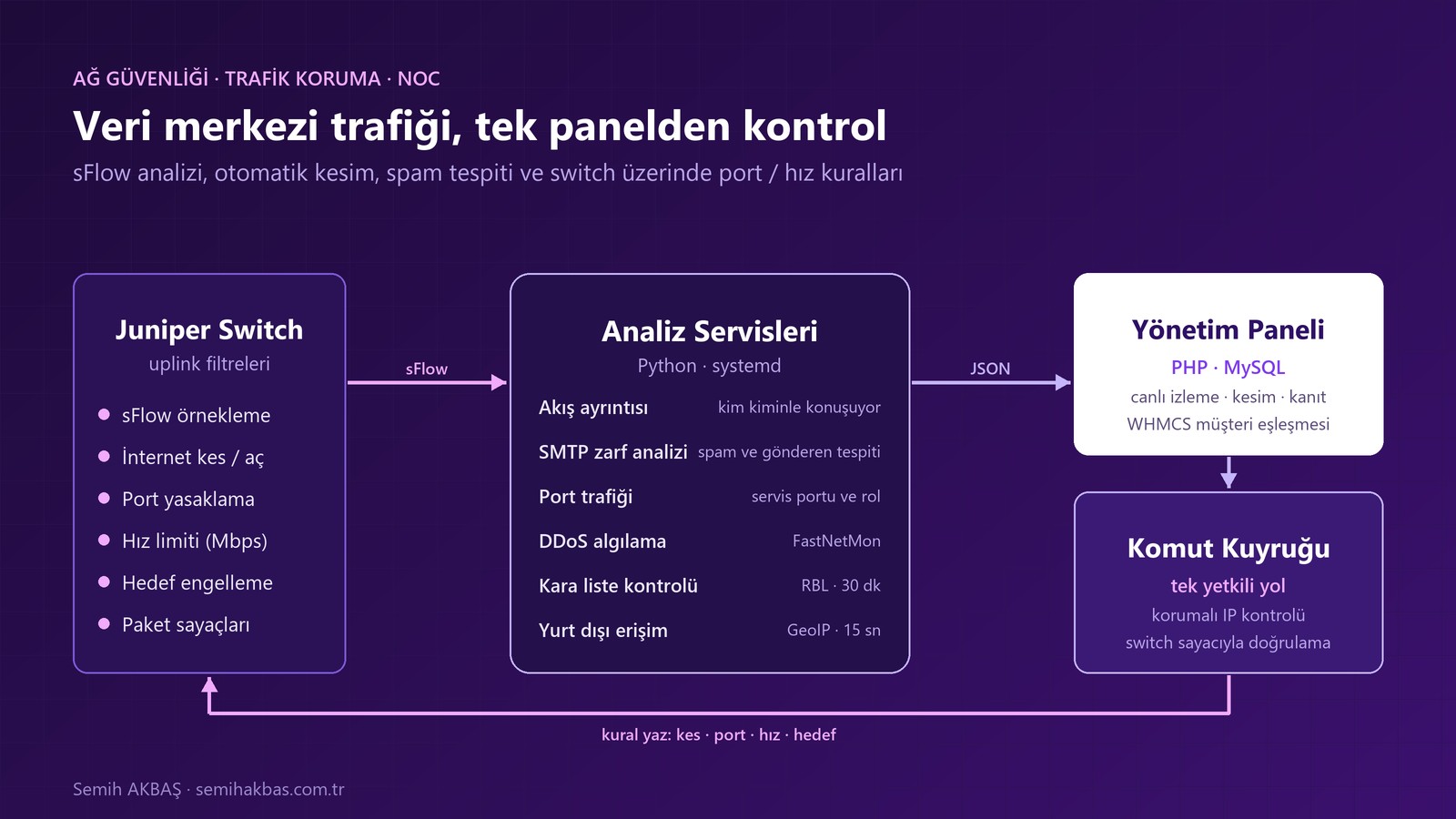
- sFlow collection and distribution: sFlow v5 datagrams coming from the switch are received by a single distributor service and replicated simultaneously to multiple analysis services.
- DDoS detection: Volumetric attack detection with FastNetMon.
- Analysis services (Python, systemd): Flow detail, SMTP envelope parsing, port traffic, mail monitoring, blocklist checking and foreign access; each runs as an independent service or timer and leaves its result for the panel as JSON.
- sFlow parser: Sampled packet headers (Ethernet / IPv4 / TCP-UDP) are decoded directly; there is no dependency on external libraries.
- Management panel: PHP and MySQL; session management and CSRF protection on all actions.
- Command queue: The panel writes an action to a queue in the database; only the queue processor connects to the switch and applies the rule to the Junos configuration (prefix-list and firewall filter terms).
- Deployment: Deployment scripts that take an automatic backup before every upload and verify the files after the upload.
Security and Operating Principles
- Single-path rule: The only component that accesses the switch is the command queue processor; even if the panel is compromised, the switch management cannot be reached directly.
- Network boundary: Cut-offs and scans can only be performed for the data center's own IP blocks; an address outside the network is rejected.
- Measure, don't guess: Since sFlow sampling happens before the filter, the counters show attempts, not deliveries. Whether a rule actually works is always verified with the switch's own packet counter.
- Backup first, then change: A backup is taken before every action that touches the live configuration and verified afterwards.
- Test environment: Panel pages are tested independently of production with SQLite and fake data; analysis services are tested with realistically generated sFlow datagrams. It is also verified separately that a request without CSRF writes no record.