A store-to-store transfer program for Nebim V3
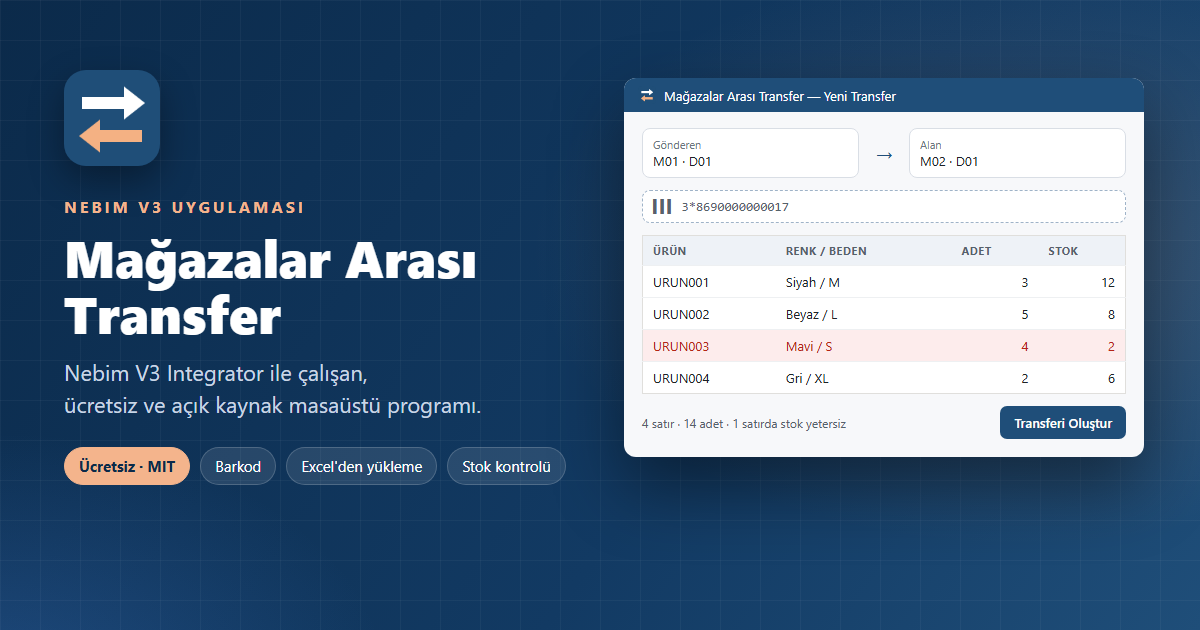
Store-to-Store Transfer (Mağazalar Arası Transfer) is a free and open-source Windows desktop program built for retail companies that use Nebim V3. It quickly prepares product transfers between stores and warehouses by barcode or from Excel, checks stock in the sending warehouse and records the transfer in Nebim with the same structure the store register produces.
The program works through the Nebim V3 Integrator and has no database of its own. After installation, you only need to enter the Integrator connection details.
What does it do?
- Starts a transfer in a few clicks with sending and receiving store/warehouse selection.
- Barcode scanning: You can enter a quantity with a single scan by typing
3*barcode; you can also search by product code or name. - Bulk upload from Excel: Hundreds of rows are added at once with Barcode and Quantity columns, or Product Code, Color, Size and Quantity columns; a blank template is available from within the program.
- Stock check: Shows the available stock in the sending warehouse and marks rows with insufficient stock in red.
- Check and preview before saving: Nebim checks first and a preview opens without writing anything.
- Same record structure as the store register: A transfer order and the dispatch slip linked to it are created; by default it goes to the receiving store's acceptance queue, meaning the goods appear as in transit.
- Transfer history: Filters for date, store and "in transit only", slip printing and export to Excel.
Who is it for?
For retail, ready-to-wear and textile companies that use Nebim V3 and have more than one store or warehouse. It is designed for teams that want to prepare bulk transfers, such as balancing stock between stores, end-of-season collection, new store openings or warehouse-to-store shipments, centrally by barcode and from Excel instead of entering them one by one at the register.
Requirements
- Windows 10 / 11 (64-bit)
- Nebim V3 and a running Nebim V3 Integrator
- For the one-time Nebim setup, an authorized account on SQL Server or IT support
- In Nebim, at least one store transfer made through the store register and linked to an order (the program uses it as a template)
Download
All files are free. You can verify that the file you downloaded has not been altered using the SHA-256 value below (PowerShell: Get-FileHash file_name).
| File | Size | Description | SHA-256 |
|---|---|---|---|
| MagazaTransfer_Setup_1.1.0.exe | 30.1 MB | Windows installer (does not require administrator rights) | 9b99df1981ca49f4e6b010f2d781475e459edeeb881915fce30045ffab2a078b |
| MagazaTransfer_Tasinabilir_1.1.0.zip | 41.0 MB | Portable version: extract to a folder and run MagazaTransfer.exe | 4900265c07699ff74ff6e173d7da80b4f3376049ac2440fcbe8a5a397f5d7c07 |
| MagazaTransfer_NebimKurulum_1.1.0.sql | 36 KB | Queries and procedure to be installed once in Nebim (for IT, via SSMS) | 5680e01277cb2224b00fa53ec7be30bdb7d16a3da62c0f5525edbb4f7f61cf3f |
| MagazaTransfer_NebimKaldirma_1.1.0.sql | 1 KB | Script to remove it from Nebim | aaaec1d5ea38ec131640ca654efa93330ec173c037e21adbdbd5e033476e41b0 |
| MagazaTransfer_Kaynak_1.1.0.zip | 55 KB | Source code (README.md and LICENSE included) | 58f0c38ac120cd0d4b141d16850b884048a59c86b39a5fff4422d6ae71b36c18 |
List of checksums: SHA256SUMS_1.1.0.txt · License text: LICENSE (MIT)
Important warnings
- The program writes to Nebim tables. Try it on a test database first; before going live, check a few transfers against the Nebim screens and stock. Use is at the user's own responsibility.
- e-Waybills (e-İrsaliye) are not issued by this program; they must be issued from Nebim after the transfer.
- Nebim, Nebim V3 and Nebim Integrator are products and trademarks of Nebim Neyir Bilgisayar A.Ş. This program is not an official Nebim product and is not affiliated with Nebim.
- The installer is not digitally signed; Windows SmartScreen may show an "unrecognized app" warning. You can continue with "More info" → "Run anyway". You can verify the file with the SHA-256 value above.
Installation steps
- Download and run
MagazaTransfer_Setup_1.1.0.exe(or extract the portable zip to a folder). - Open the program; enter the Integrator address, database name, user group and username, then click Test Connection.
- The program asks for the Nebim setup. There are two ways:
- The Install button in the program: an authorized SQL Server account is entered once and is not saved anywhere.
MagazaTransfer_NebimKurulum_1.1.0.sql: replace theSIRKET_VERITABANIplaceholder inside it with your Nebim company database name and run it in SSMS.
- The setup only adds 6 read queries named
GetMTR_*to theNebimV3Master.dbo.bsReportQuerytable and thesp_MTR_MagazaTransferprocedure to the company database; it does not touch any other table.
User guide
A store-to-store transfer program for retail companies that use Nebim V3. It works through the Nebim V3 Integrator;
the program has no database of its own. Settings are kept in the config.json file in the program folder
(or %APPDATA%\MagazaTransfer\config.json if the folder is not writable).
Requirements
- Windows 10 / 11 (64-bit)
- A running Nebim V3 Integrator (address, database name, user group, username; password if required)
- For the one-time Nebim setup, an authorized account on SQL Server or an IT staff member who will run the setup script
- In Nebim, at least one store-to-store transfer made through the store register and linked to an order (the procedure uses it as a template)
Installation
- Installer: Run
MagazaTransfer_Setup_x.y.z.exe(does not require administrator rights; installs into the user's own folder). - Portable: Extract
MagazaTransfer_Tasinabilir_x.y.z.zipto a folder and runMagazaTransfer.exe.
On first launch, the Integrator details are requested. If a password is entered, it is written to config.json using Windows' own encryption (DPAPI);
only the same Windows user on the same computer can decrypt it. Verify with Test Connection.
One-time setup in Nebim
Because the Integrator can only run queries registered in Nebim, the program checks the setup on first connection; if it is missing, the Nebim Setup window opens. The setup adds only the following and does not touch any other table:
| Where | What |
|---|---|
NebimV3Master.dbo.bsReportQuery (ReportName = V3Integrator) |
The read queries GetMTR_SURUM, GetMTR_MAGAZALAR, GetMTR_BARKOD, GetMTR_STOK, GetMTR_TRANSFER, GetMTR_TRANSFERSATIR |
| Nebim company database | The dbo.sp_MTR_MagazaTransfer transfer-recording procedure |
There are two ways:
1. Install: An authorized SQL Server account is entered once (not saved anywhere) and the program installs it.
2. Setup script: In the file MagazaTransfer_NebimKurulum_x.y.z.sql, replace the SIRKET_VERITABANI placeholder with the Nebim company
database name and run it in SSMS (it can also be generated from within the program with Save Setup Script).
To remove it, use MagazaTransfer_NebimKaldirma_x.y.z.sql. When the program version changes, the setup is requested again.
Try it in a test environment first. The procedure writes directly to Nebim tables. Before going live, make a few transfers on a test database and check them against the Nebim screens and stock.
Usage
New Transfer
1. Select the sending and receiving stores (and their warehouses).
2. Scan a barcode (3*barcode = 3 pieces), pick a product by code/name with Search Product, or use Load from Excel
(columns: Barkod + Adet, or Ürün Kodu + Renk + Beden + Adet; use Template for a blank template).
3. The table shows the available stock in the sending warehouse; rows with insufficient stock are red.
4. Create Transfer: Nebim checks first (writes nothing) and a preview opens; click Save to Nebim to record it.
The record is the same as the one the store register makes: a transfer order (…-S-2-…) + the dispatch slip linked to it (…-S-6-…),
with stock leaving the sending warehouse. By default the transfer goes to the receiving store's acceptance queue (the goods appear as in transit);
if this is turned off in the connection settings, it is written as already accepted and enters the receiving warehouse immediately.
e-Waybills (e-İrsaliye) are not issued by this program. After the transfer slip is created, the sending store issues the e-Waybill from Nebim.
Transfer History: Slips filtered by date range, store and "in transit only"; double-click to see the rows, Print Slip, Export to Excel.
Common issues
- "No store-to-store transfer to use as a template was found": Make at least one store transfer linked to an order through the register in Nebim.
- "Insufficient stock in the sending warehouse": The Nebim available stock (after reservations and dispatch orders are deducted) is not enough.
- The Integrator occasionally drops the session; the program reconnects automatically. If no response is received while saving, the program warns you: check Transfer History to see whether the slip was created.
Frequently asked questions
How do you make a store-to-store transfer in Nebim V3?
In Nebim V3, a transfer is normally made from the store register with an order and a dispatch slip. The Store-to-Store Transfer program creates the same record centrally: you select the sending and receiving store and add products by barcode or from Excel; the program checks stock and writes the transfer order and the dispatch slip linked to it into Nebim.
Is the program paid?
No. The program and its source code are free under the MIT license; anyone can use, modify and distribute it and include it in their own product. The license text only needs to remain with the copies.
Is it an official Nebim product?
No. The program is independent software that works with the methods offered by the Nebim V3 Integrator; it is not affiliated with Nebim.
What does it change in the Nebim database?
The one-time setup adds 6 read queries that the Integrator can run and a single procedure that records the transfer. The transfer record has the same structure as the transfer order and dispatch slip created by the store register. It can be fully undone with the removal script.
Does it issue e-Waybills?
No. After the transfer slip is created, the e-Waybill is issued from Nebim by the sending store.
Is my password safe?
If an Integrator password is entered, it is stored using Windows' own encryption (DPAPI); only the same Windows user on the same computer can decrypt it. The authorized SQL Server account is used once during setup and is not saved anywhere.
Release notes — 1.1.0
- First public release, MIT licensed.
- The Nebim recording procedure is named
sp_MTR_MagazaTransfer. - The installer, portable version, Nebim setup/removal scripts and source code are offered as separate files.
For those who want to develop
MagazaTransfer_Kaynak_1.1.0.zip contains the Python (PySide6) source code and README.md (development environment, packaging, architecture and conventions). Packaging requires Python 3.13 and Inno Setup 6. The source code and release history are on GitHub: github.com/Sem-h/nebim-v3-magaza-transfer. New releases are published on the Releases page; you can also send bug reports and suggestions through Issues.
License
MIT. The program and its source code are free; anyone can use, modify and distribute them and include them in their own product; the license text must remain with the copies. The program is provided "as is", with no warranty of any kind. Read the license text.
Support and bug reports
For questions, suggestions or bug reports, you can use the contact form. When reporting a bug, it is enough to include the program version and the message you see; please do not share passwords or company information.